Shopify and SEO: The Reality They're Hiding From You
You've set up your Shopify store, invested in stunning product photos, configured your payment methods... and now you're waiting for customers to pour in. Except it doesn't work that way!
Here's the thing: 43% of online store traffic comes from organic search (source SEO.com). So without a solid SEO strategy, you're literally leaving money on the table. And with over 4.4 million active Shopify stores in 2025, competition has never been fiercer!
But here's the good news: Shopify offers a solid technical foundation for SEO. What's unfortunate is that 80% of store owners don't even exploit 10% of its full potential. That's where we come in!

Why Shopify SEO is Different (and More Important Than Ever)
Let's start with some numbers:
- 98 out of 100 visitors leave your store without buying (average conversion rate: 1.4% to 3%) (source Shopify)
- Organic traffic converts at 2.93% on Shopify—the best rate of all channels! (source The Social Shepherd)
- A well-optimized store can double its organic traffic in 6-12 months
Bottom line: every position gained in Google = more qualified visitors = more sales. Without spending a dime on advertising!
Shopify-Specific Challenges
Shopify is great for launching quickly, but SEO-wise, there are some traps to consider:
- Imposed URL structure (those infamous /products/ and /collections/)
- Duplicate content between product variants
- Apps that slow down your site
- Themes poorly optimized for SEO
But don't panic—every problem has its solution, and we'll explain everything.
The 15 Optimizations That Change Everything
1. E-commerce Keyword Research (The $10,000 Mistake)
The classic mistake: targeting "shoes" when you sell "minimalist running shoes for women." Instead, aim for ultra-specific keywords with clear purchase intent:
- "buy minimalist running shoes women"
- "barefoot running shoes Canada"
- "best zero drop trail shoe"
Long-tail keywords (4+ words) have less competition and convert 2.5x better due to more qualified traffic! And solid keyword research is the foundation of EVERYTHING.
2. Optimize Your Product Pages Like a Pro
Your product pages are your cash machine. Here's how to transform them:
Meta Titles That Work
- Bad: "Red T-shirt"
- Good: "Red Organic Cotton Fair Trade T-shirt | Free Shipping in Canada"
Descriptions That Sell AND Rank:
- Minimum 300-500 words of unique content (no copy-paste from suppliers!!)
- Naturally integrate your keywords
- Answer frequently asked questions directly in the description
- Add detailed technical specs
The Secret to Optimized Images:
-
- Descriptive file names: "red-organic-cotton-women-tshirt.jpg" (not "IMG_1234.jpg")
- Precise alt text for each image
- Image compression (aim for under 100KB per image)
- WebP format for optimal speed
- Little gift: Squoosh, a free Google tool to compress your images up to 80% and convert them to WebP in one click.
3. Master Your Collection Pages
This is where 90% of Shopify stores leave money on the table! Your collection pages can rank for high-volume keywords. But you need to optimize them:
- Add UNIQUE content (minimum 300-800 words, preferably at the bottom of the page)
- Create thematic collections based on your keywords
- Optimize title and meta description
- Use SEO-friendly filters (avoid JavaScript that blocks indexing)
Concrete Example:
Instead of just "Women's Shoes," create:
- "Women's Running Shoes"
- "Women's Hiking Shoes"
- "Women's Minimalist Shoes"
Each of these pages targets a specific keyword and attracts ultra-qualified traffic!

4. Loading Speed (The Silent Conversion Killer)
A slow site = fleeing customers. It's mathematical:
- Each second of delay = 7% lost conversions
- 53% of mobile visitors abandon if the page takes more than 3 seconds to load
- Google penalizes slow sites in its algorithm
To analyze all this, check out Google's PageSpeed Insights.
Shopify Quick Wins:
- Use a lightweight, well-coded theme (Dawn is excellent!)
- Limit the number of apps (each app = additional code)
- Enable lazy loading for images (except those above the fold)
- Compress ALL your images before upload
- Use Shopify CDN (it's automatic, but make sure to use it properly)
Free Technical Audit

5. Shopify URL Structure (Learn to Live With It)
Bad news: Shopify imposes URLs with /products/ and /collections/. You can't change them. But good news: Google doesn't care!
What matters is:
- Short and descriptive URLs
- Your keywords in the product handle
- No special characters or random numbers
Example:
- Don't like: yoursite.com/products/prod-12345-red
- Like: yoursite.com/products/organic-cotton-red-women-tshirt
6. Schema Markup (Your Secret Weapon for Rich Snippets)
Schema markup is the code that tells Google "hey, this is a product, here's its price, reviews, availability." Your products appear with stars, price, and availability directly in Google, boosting click-through rates!
On Shopify:
- Product schema is integrated by default (Product, Price, Availability)
- Add Review schema with an app like Judge.me or Loox
- Verify with Google Rich Results Test
7. Customer Reviews (A Too Often Neglected Goldmine)
Customer reviews are an SEO goldmine:
- They add unique user-generated content
- They create natural long-tail keywords
- They improve your conversion rate (and Google sees that!)
- They generate rich snippets with stars in Google
How to Maximize Reviews:
- Send an automated email 7-14 days after delivery
- Offer a small incentive (10% off next purchase)
- Respond to ALL reviews (even/especially bad ones!)
- Display reviews on your product AND collection pages
8. Strategic Internal Linking
Internal linking is how your pages "talk" to each other. And it's powerful!
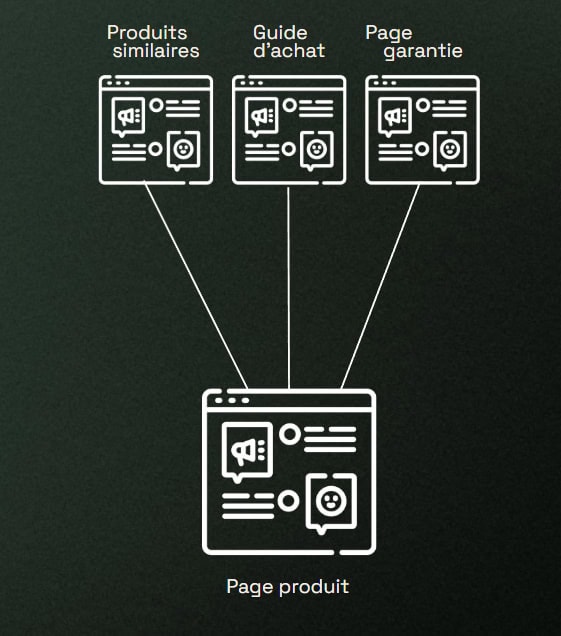
Shopify Opportunities:
- Link your complementary products ("You might also like")
- Create links from your blog posts to your products
- Link your collections to each other
- Add links in your product descriptions
Simply put, every important page should be accessible in 3 clicks maximum from the homepage!
9. The E-commerce Blog (Your Organic Traffic Machine)
"A blog to sell products? Really?" Yes, REALLY! Stores with an active blog generate half more leads than those without. Think of it as little entry doors to your online store—you target users asking specific questions related to your products, and you MUST cover them.
- Buying Guides: "How to Choose Your Running Shoes"
- Tutorials: "5 Ways to Wear Your Silk Scarf"
- Comparisons: "Organic Cotton vs Conventional Cotton: What You Need to Know"
- Lifestyle: "10 Zero-Waste Tips for Beginners"
10. Optimize for Mobile Search (It's More Than Responsive)
60% of online purchases happen on mobile in 2025. Your Shopify store MUST be flawless on smartphones.
Beyond Responsive Design:
- Buttons big enough for fingers (minimum 44x44 pixels)
- Simplified forms (fewer fields = more conversions)
- Clear and intuitive navigation
- No intrusive pop-ups on mobile (Google penalizes!)
- One-page checkout if possible
11. Metadata That Converts
We touched on this earlier, but your meta titles and descriptions are your free advertising in Google!
Winning Formula for Products:
- Title: [Product Name] + [Key Benefit] + [Brand] (max 60 characters)
- Meta Description: Benefits + Call-to-action + USP* (max 155 characters)
* Unique Selling Proposition
Example for an Organic T-shirt:
- Title: "Organic Fair Trade Cotton Men's T-shirt | Free Shipping - Your Brand"
- Description: "100% certified organic cotton t-shirt. Exceptional comfort, ethical production. Free shipping in Canada. 30-day money-back guarantee. Order now!"
12. Manage Duplicate Content (The Shopify Plague)
Shopify automatically generates duplicate content:
- A product in multiple collections = multiple URLs
- Product variants (colors, sizes) = similar pages
- Filter pages = multiple URLs
Solutions:
- Use canonical tags (Shopify partially handles these automatically)
- In Settings > Preferences, disable tag pages if you don't use them
- Use unique descriptions for each important variant
- Block unnecessary filter URLs in robots.txt

13. E-commerce Backlinks (How to Get Them Without Paying)
Inbound links remain one of Google's top 3 ranking factors. But how do you get them when selling products?
Here are strategies that work for e-commerce:
- Free products to influencers/bloggers in exchange for reviews
- Create ultra-shareable content (infographics, studies, guides)
- Guest blogging on niche sites
- Partnerships with complementary brands
- Press relations (especially if you have a unique story)
14. Optimize Your Core Web Vitals
In 2026, Core Web Vitals have become critical for e-commerce:
- LCP (Largest Contentful Paint): Your product image must load in under 2.5s
- INP (Interaction to Next Paint): "Add to Cart" buttons responsive in under 200ms
- CLS (Cumulative Layout Shift): No content shifting during loading
A good score can improve your conversions by 24% according to Google studies!
15. Analyze and Adjust with Google Analytics 4
You can't improve what you don't measure!
Essential E-commerce Metrics:
- Organic traffic and its evolution
- Conversion rate by source (organic vs paid vs direct)
- Average positions of your keywords (with Google Search Console connection)
- Exit pages (where do people abandon?)
- Time on product pages
- Add-to-cart rate per page
Let's Talk About Your Store

Why Traditional SEO Is No Longer Enough
We've seen it with LLMs and SEO: people are increasingly asking their questions to ChatGPT, Gemini, and Perplexity. If a customer asks ChatGPT "What's the best store to buy eco-friendly running shoes in Canada?" The AI responds with 3 stores, and if you're not there, you've lost the lead!
The Solution: Combine SEO and GEO
GEO (Generative Engine Optimization) optimizes your presence for conversational AIs.
How AIs Choose Their E-commerce Recommendations:
- Demonstrated expertise (detailed content, buying guides)
- Brand mentions across the web
- Numerous and positive customer reviews
- Consistent information everywhere (NAP consistency)
- Recent and up-to-date content
The ideal approach is a hybrid strategy, which we implement at Rablab:
- SEO to dominate Google and capture search traffic
- GEO to be recommended by conversational AIs
- Google Shopping to appear in product searches
- Retargeting to convert hesitant visitors
Essential Tools for Your Shopify SEO
The Essentials (Free)
- Google Search Console: Track your positions, traffic, errors
- Google Analytics 4: Analyze your visitors' behavior
- PageSpeed Insights: Test your loading speed
- Google Rich Results Test: Verify your schema markup
Premium Tools (Worth the Investment)
- SEMrush or Ahrefs: Keyword research, competitor analysis, backlinks
- Screaming Frog: In-depth technical audit
- Surfer SEO: Guided on-page optimization
- Judge.me or Loox: Customer review management with schema markup
Shopify SEO Apps (Use Sparingly!)
- Plug in SEO: Automated page audit
- SEO Image Optimizer: Automatic alt text optimization
- JSON-LD for SEO: Advanced schema markup
Remember: fewer apps = faster site = better SEO!

Ready to Explode Your Organic Traffic?
Shopify SEO isn't magic. It's a science. A science we've mastered at Rablab for years! But let's be honest—reading a guide and applying it are two different things. Between managing your store, suppliers, customer service, and marketing... SEO can quickly fall by the wayside.
That's exactly where we come in!
At Rablab, we don't do cookie-cutter Shopify SEO. We create custom strategies for each store, each niche, each goal. Whether you sell 10 products or 1,000, whether you're in Quebec or elsewhere in Canada, we have the solution. And if you need an immediate boost while SEO takes effect, we also manage your Google Ads campaigns and your Google Shopping Feed! You get more traffic, more sales, more growth. And on your end, you can finally focus on what you do best: growing your brand!
Get My Free SEO Audit